Order post from webshop to Odoo
How to configure an order push from BoozeOrder to the Odoo ERP.
Prerequisites
- The BoozeOne plugin installed in nopCommerce.
- The odoo_rest_api module installed on the Odoo database the webshop will post into.
How it works
The important bit to understand with this integration: the webshop doesn't tell Odoo what to charge. It sends the customer code, the article codes and the quantities, and Odoo works out the prices itself from that customer's tier price. The webshop's own amounts are included in the API payload, but only so the two can be compared afterwards. If they disagree, the order gets flagged and somebody looks at it.
It fires the moment the order is placed. If Odoo is down or the token's wrong, a scheduled task picks it up again every 15 minutes and keeps trying, waiting a bit longer each time. Pushing the same order twice does not duplicate it, because the implementation is idempotent.
Where the settings live
nopCommerce admin → Configuration → Settings → All settings (advanced), then filter the name on boozeonesettings.
You'll see about 23 of them. Most aren't needed here.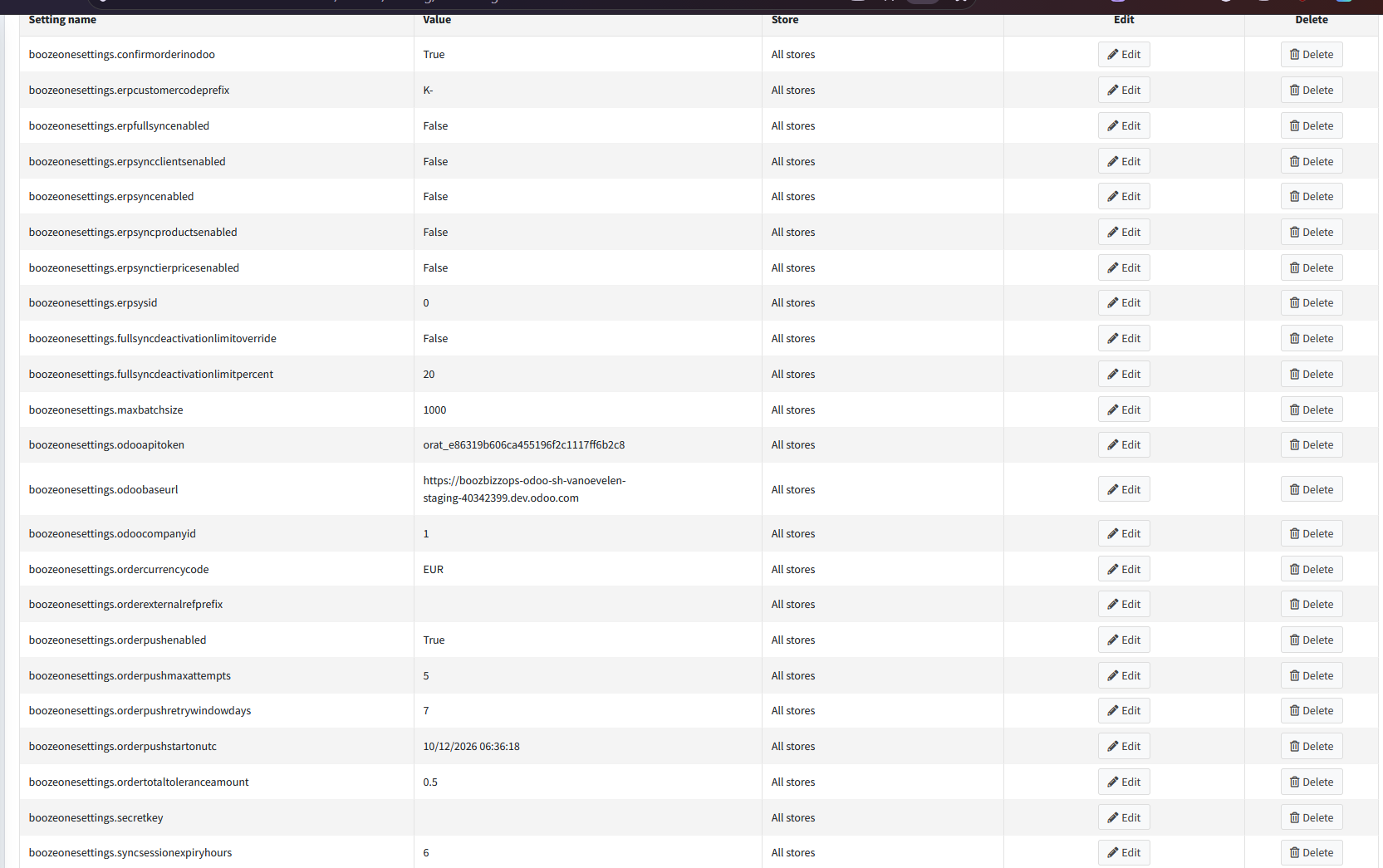
The four that actually matter and have to be verified
| Setting | What to put |
|---|---|
| orderpushenabled | True. It ships off, so nothing happens until you flip this. |
| odoobaseurl | The Odoo URL, just the root. No path on the end. |
| odooapitoken | The token created in Odoo (see below). |
| odoocompanyid | Which res.company the orders belong to. |
Two worth a second look, and they may differ per ordering platform
erpcustomercodeprefix. K- on instances whose Odoo partner references carry it, empty on the ones that don't use it.
orderexternalrefprefix. Leave it empty normally. It matters when two ordering platforms post into the same Odoo database, because the reference is just the prefix plus the webshop's order number, and two shops both numbering from 1 will eventually produce the same one. What happens then is worse than duplicates: Odoo recognises the reference, hands back the order the other shop already created, and the second order is never made while looking like it succeeded. Give each platform its own prefix. Likely to come up where a client runs both a B2B and a B2C platform.
The rest can be left as they are
| Setting | Default | |
|---|---|---|
| confirmorderinodoo | True | False leaves quotations instead of confirmed orders |
| ordercurrencycode | EUR | |
| orderpushmaxattempts | 5 | how many retries before it stops trying |
| orderpushretrywindowdays | 7 | how far back the retry task bothers looking |
| ordertotaltoleranceamount | 0.50 | how far the totals can drift before it's flagged. 0 also means 0.50 |
| orderpushstartonutc | fills itself in | the line between history and live. Anything older is never pushed. Drag it backwards if you want to backfill |
And the ones that shouldn't be touched
erpsync*, fullsync*, maxbatchsize, erpsysid, syncsessionexpiryhours, secretkey.
Those belong to the other direction, Odoo pushing master data out to the ordering platform. Order push works fine with every one of them switched off.
Where things live in Odoo
Setting → User → REST API Admin? (Allow access)
Two separate places, which catches people out.
Sales → BoozeOrder Integration holds the API tokens. Developer mode has to be on or the menu stays hidden.
Settings → BoozeOrder Sync holds the configuration, including the one setting that applies to incoming orders.
The Sync Queue sitting next to the tokens is the other direction again. Nothing to do with orders coming in.
Making the token
One per webshop. Sales → BoozeOrder Integration → API Tokens → New.
| Field | What to do with it |
|---|---|
| Name | Something you'll still recognise in a year. "Vanovelen webshop" |
| Token | Odoo generates this, you can't type your own. Copy it into odooapitoken on the webshop. |
| Active | Tick it. An inactive token is rejected the same way a wrong one is. |
| Allowed IPs | Empty means anyone holding the token can post. Put the webshop's outbound IP in if you know it. |
| Salesperson | See below. |
There's a Regenerate Token button in the header if you ever need to roll it. It kills the old token the instant you press it, so have the webshop settings open in another tab first.
The Salesperson field
Point it at an internal user named after the platform. Every order arriving on this token gets assigned to that user, so when three webshops post into the same database you can still tell whose order is whose, filter on it, and report on it.
Leave it empty and everything piles up under the superuser, which tells you nothing.
The tolerance
Settings → BoozeOrder Sync → Incoming orders → Total tolerance, default 0.50.
It's an amount in euro, not a percentage. Any further apart than that and the order gets flagged.
Odoo keeps its own copy and the webshop keeps another. They never compare notes, each one flags on its own figure, so if you change one you probably want to change the other too.
When an order gets flagged
You'll see a banner on the Odoo sales order saying one of two things.
"Did not arrive complete" means some lines had no matching product in Odoo. They're simply not there, and the order is worth less than the customer actually paid. The missing lines are listed underneath.
"Total does not match" means everything arrived, but Odoo priced it differently. In practice this is nearly always a commercial discount or a deposit that the two systems disagree about, not a bug.
Both are snapshots taken the moment the order landed. Fixing the order afterwards won't clear the flag, and nothing gets sent back to the webshop. That's deliberate, so the record of what arrived stays honest.
The same detail is written as a note on the webshop order, if you'd rather look there.